


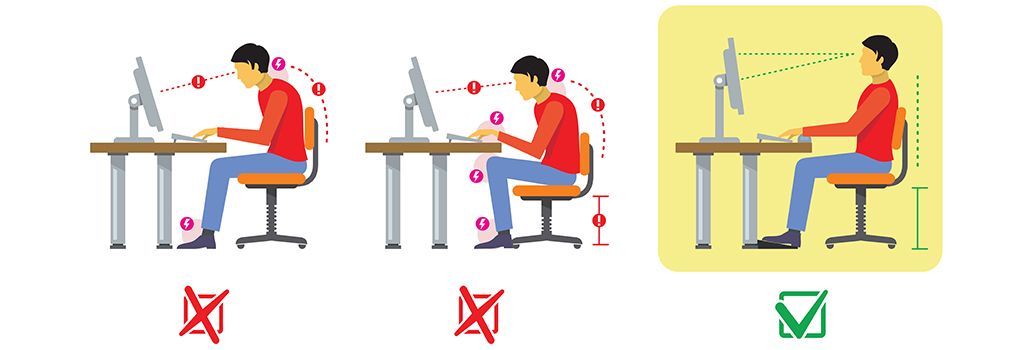
- Tips for Proper Posture at Your DeskThe problem is that at home we do not always have the right space to create our own workstation with the ergonomics required for a proper working environment. Adopt the correct posture at your desk by following the tips below:
- Choose an ergonomic chair and adjust its height, tilt and armrests so that you can keep your arms at a 90º angle to your body.
- Align your spine and make sure that your back is fully supported by the back of the chair and that the screen is at eye level.
- Keep your feet resting on the floor, with your soles flat, and adjust the chair to the correct height. In some cases, a footrest may help.
- Position your computer peripherals correctly. There are many keyboard and mouse models designed to reduce strain on the musculoskeletal system. If you have a laptop and need to bend your neck downwards to look at the screen, use a monitor riser.
- Get up from your seat once every hour and activate your muscles. Slowly move your neck in semicircles from shoulder to shoulder, stretch your arms and back, and take the opportunity to move your legs.
- Tips for Proper Posture at Your DeskThe problem is that at home we do not always have the right space to create our own workstation with the ergonomics required for a proper working environment. Adopt the correct posture at your desk by following the tips below:
Frequently asked questions
Where should the screen be?
Straight in front of you, directly behind the keyboard, about an arm’s length away (50 to 100 cm), with the top of the screen at or slightly below eye level. With a laptop, a stand plus a separate keyboard and mouse help.
How should I sit at my desk?
Your feet should rest flat on the floor or on a footrest, your elbows should stay close to your body with relaxed shoulders, and your wrists should be straight, with your hands at or slightly below elbow level. Choose a chair that supports your spine.
Is a good chair enough if I sit for hours?
No. However well your workspace is set up, staying in the same position for hours puts strain on the body. Get up and walk around as often as you can, work standing up where possible and stretch your hands, fingers and arms from time to time.
